Use Case
Generate on-brand product shots with Rightbrain in minutes
Creating on-brand product imagery is usually slow and expensive.
Results can be inconsistent, or depend on prompt-writing skills.
With Rightbrain + Gemini 2.5 Flash you can generate scenes from text, image, or both:
- Upload a product image.
- Describe the setting in plain English (e.g. “place this earring on a beach”).
- Generate consistent, realistic shots in seconds.
Plug the task into your stack via API or MCP to scale from a one-off image to a full catalogue refresh.
Step-by-Step Guide
1. Build task
Enable Gemini Flash image in your Rightbrain task template via MCP.
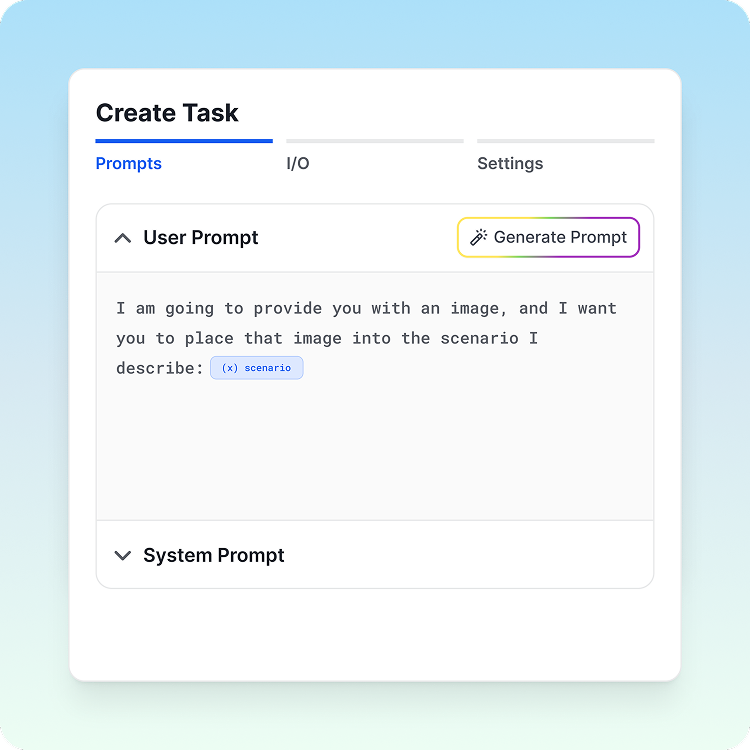
2. Provide your product image
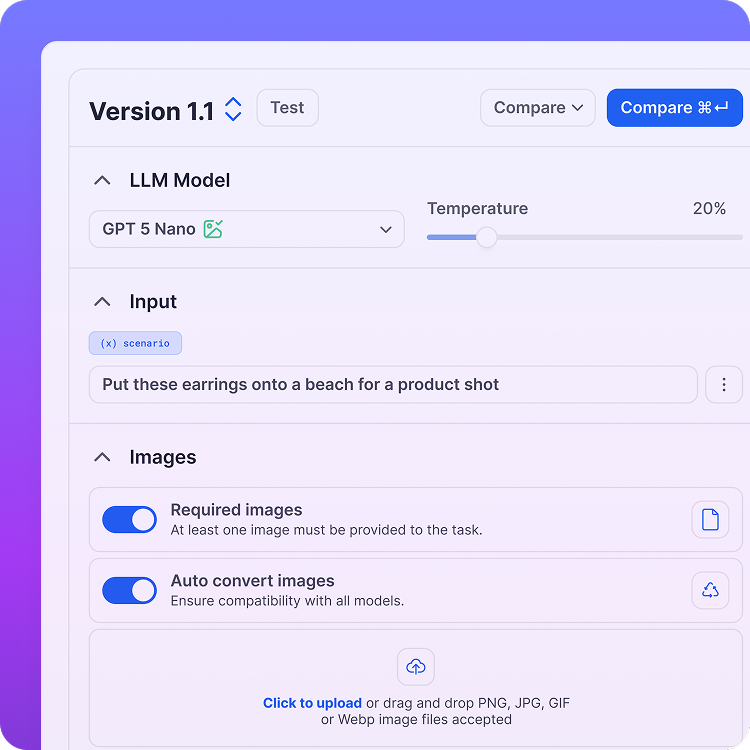
Upload the source image and enter a description of the new scenario you want to generate.
3. Describe the scenario
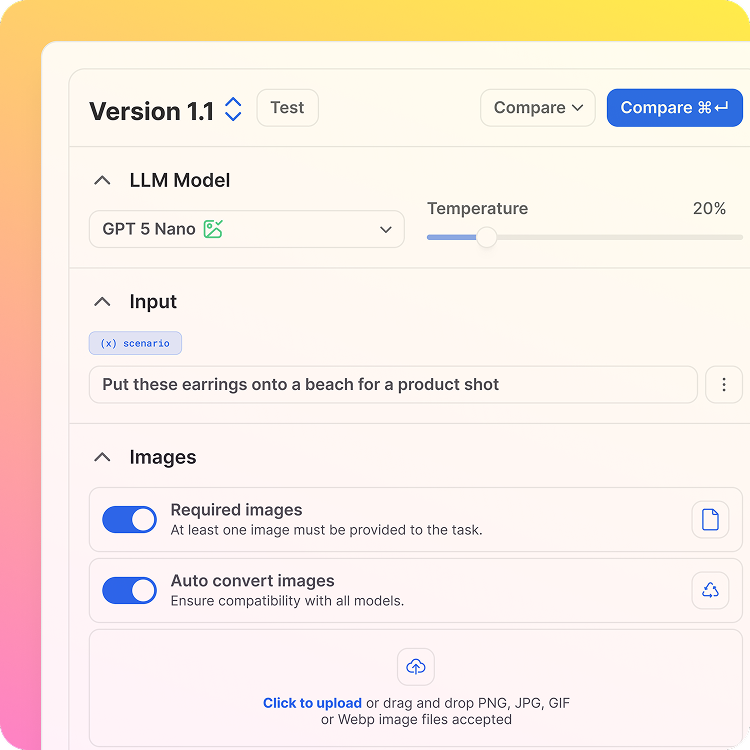
Describe the scenario in which you want the original source image placed, for example "put these earrings on a beach".
4. Generate product shot
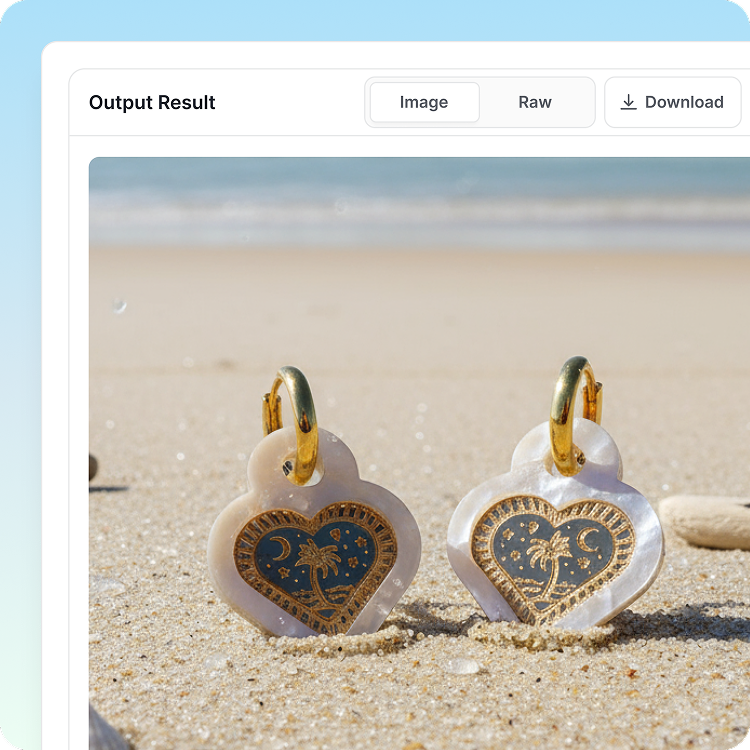
Run the task to send your source image and additional instructions to the image generation model for processing.
5. Review & export
Review your new image before integrating into your existing workflows with a simple API call.
Who is this for?
- Ecommerce teams: Produce product photos for any scenario, matching to seasons or themes.
- Marketing teams: Create campaign visuals and continuously test new imagery.
- Retailers: Generate high-quality imagery for large catalogues that follows brand guidelines.
Key benefits
- Save time and cost vs. traditional product photography.
- Preserve product accuracy while enhancing depth, realism, and context.
- Scale across entire catalogues with a simple API or MCP endpoint.
- Generate unique, brand-aligned assets in minutes.
Pro Tips
- Draft a prompt that clearly outlines the type of image you want to generate and the input variables it will operate on
- Select Image as the output modal when building your task.
- Ensure you toggle 'Required Image' if you will be using an image as an input variable.
- Choose Google Flash 2.5 Image as your model of choice.
- Test and iterate on your task prompt until you've nailed the look and consistency you're looking for.
Ready to ship your next AI feature?
Book demo




Use Case
Generate on-brand product shots with Rightbrain in minutes
Creating on-brand product imagery is usually slow and expensive.
Results can be inconsistent, or depend on prompt-writing skills.
With Rightbrain + Gemini 2.5 Flash you can generate scenes from text, image, or both:
- Upload a product image.
- Describe the setting in plain English (e.g. “place this earring on a beach”).
- Generate consistent, realistic shots in seconds.
Plug the task into your stack via API or MCP to scale from a one-off image to a full catalogue refresh.
Step-by-Step Guide
1. Build task
Enable Gemini Flash image in your Rightbrain task template via MCP.
2. Provide your product image
Upload the source image and enter a description of the new scenario you want to generate.
3. Describe the scenario
Describe the scenario in which you want the original source image placed, for example "put these earrings on a beach".
4. Generate product shot
Run the task to send your source image and additional instructions to the image generation model for processing.
5. Review & export
Review your new image before integrating into your existing workflows with a simple API call.
Who is this for?
- Ecommerce teams: Produce product photos for any scenario, matching to seasons or themes.
- Marketing teams: Create campaign visuals and continuously test new imagery.
- Retailers: Generate high-quality imagery for large catalogues that follows brand guidelines.
Key benefits
- Save time and cost vs. traditional product photography.
- Preserve product accuracy while enhancing depth, realism, and context.
- Scale across entire catalogues with a simple API or MCP endpoint.
- Generate unique, brand-aligned assets in minutes.
Pro Tips
- Draft a prompt that clearly outlines the type of image you want to generate and the input variables it will operate on
- Select Image as the output modal when building your task.
- Ensure you toggle 'Required Image' if you will be using an image as an input variable.
- Choose Google Flash 2.5 Image as your model of choice.
- Test and iterate on your task prompt until you've nailed the look and consistency you're looking for.
Ready to ship your next AI feature?
Book demo

Resources
Docs

Book a Call
Use Case
Generate on-brand product shots with Rightbrain in minutes
Creating on-brand product imagery is usually slow and expensive.
Results can be inconsistent, or depend on prompt-writing skills.
With Rightbrain + Gemini 2.5 Flash you can generate scenes from text, image, or both:
- Upload a product image.
- Describe the setting in plain English (e.g. “place this earring on a beach”).
- Generate consistent, realistic shots in seconds.
Plug the task into your stack via API or MCP to scale from a one-off image to a full catalogue refresh.
Step-by-Step Guide
1. Build task
Enable Gemini Flash image in your Rightbrain task template via MCP.
2. Provide your product image
Upload the source image and enter a description of the new scenario you want to generate.
3. Describe the scenario
Describe the scenario in which you want the original source image placed, for example "put these earrings on a beach".
4. Generate product shot
Run the task to send your source image and additional instructions to the image generation model for processing.
5. Review & export
Review your new image before integrating into your existing workflows with a simple API call.
Who is this for?
- Ecommerce teams: Produce product photos for any scenario, matching to seasons or themes.
- Marketing teams: Create campaign visuals and continuously test new imagery.
- Retailers: Generate high-quality imagery for large catalogues that follows brand guidelines.
Key benefits
- Save time and cost vs. traditional product photography.
- Preserve product accuracy while enhancing depth, realism, and context.
- Scale across entire catalogues with a simple API or MCP endpoint.
- Generate unique, brand-aligned assets in minutes.
Pro Tips
- Draft a prompt that clearly outlines the type of image you want to generate and the input variables it will operate on
- Select Image as the output modal when building your task.
- Ensure you toggle 'Required Image' if you will be using an image as an input variable.
- Choose Google Flash 2.5 Image as your model of choice.
- Test and iterate on your task prompt until you've nailed the look and consistency you're looking for.
Ready to ship your next AI feature?
Book demo
For B2B Services
For Partners
Resources
Docs
Book a Call