Agent Observe: trace every run
A complete record of what each agent did, how long it took and what it cost.
 Florian RuspiHead of Growth, Rightbrain
Build an agent for your team or client and the demo is the easy part. The hard part starts the week after launch, when somebody asks what it actually did, why a response ‘looked off’ or how much it cost. Rightbrain’s Agent Observe is your answer: a complete record of each run, from the trigger to the final output, in one place and readable by the right people on the team.
Why do we need this?
Rightbrain agents are always-on, executing tasks around the clock, which is why it’s important to keep track of their reasoning and actions. Did every request get handled? What did the week cost? Which account triggered this agent run? Did it ask for approval where required? Without a record, each answer is a guess, and the lack of visibility turns into serious tech debt in the future.
For teams building agents for other businesses, the record is the proof behind a pilot making it to launch. You can point at the tasks executed, the time taken and costs. As a running example, picture a lead qualifier built for a client: a lead comes in, the agent researches it, scores it, drafts the outreach and logs the result in a shared sheet.
Run list: every run at a glance
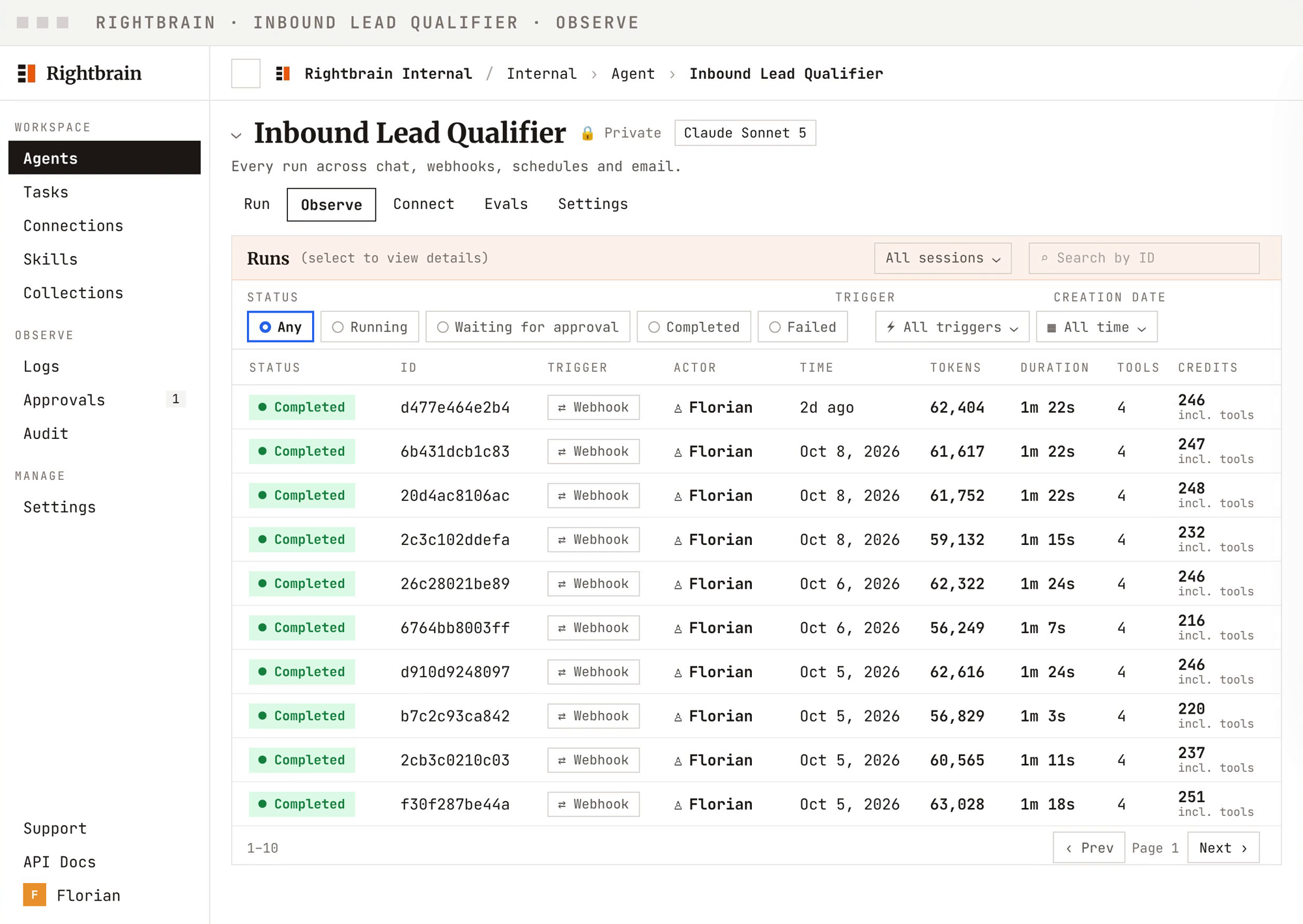
Open the Observe tab on any agent and the run list is waiting. One row per run, showing the status, a unique run ID, the trigger behind it, who ran it, when, and the duration, tool calls and credits it used.
Filter by status (running, waiting for approval, completed or failed), by trigger or by date, or search for a run by its ID. Checking the health of an agent takes seconds, without opening a single run.
Headline metrics: the cost, up front
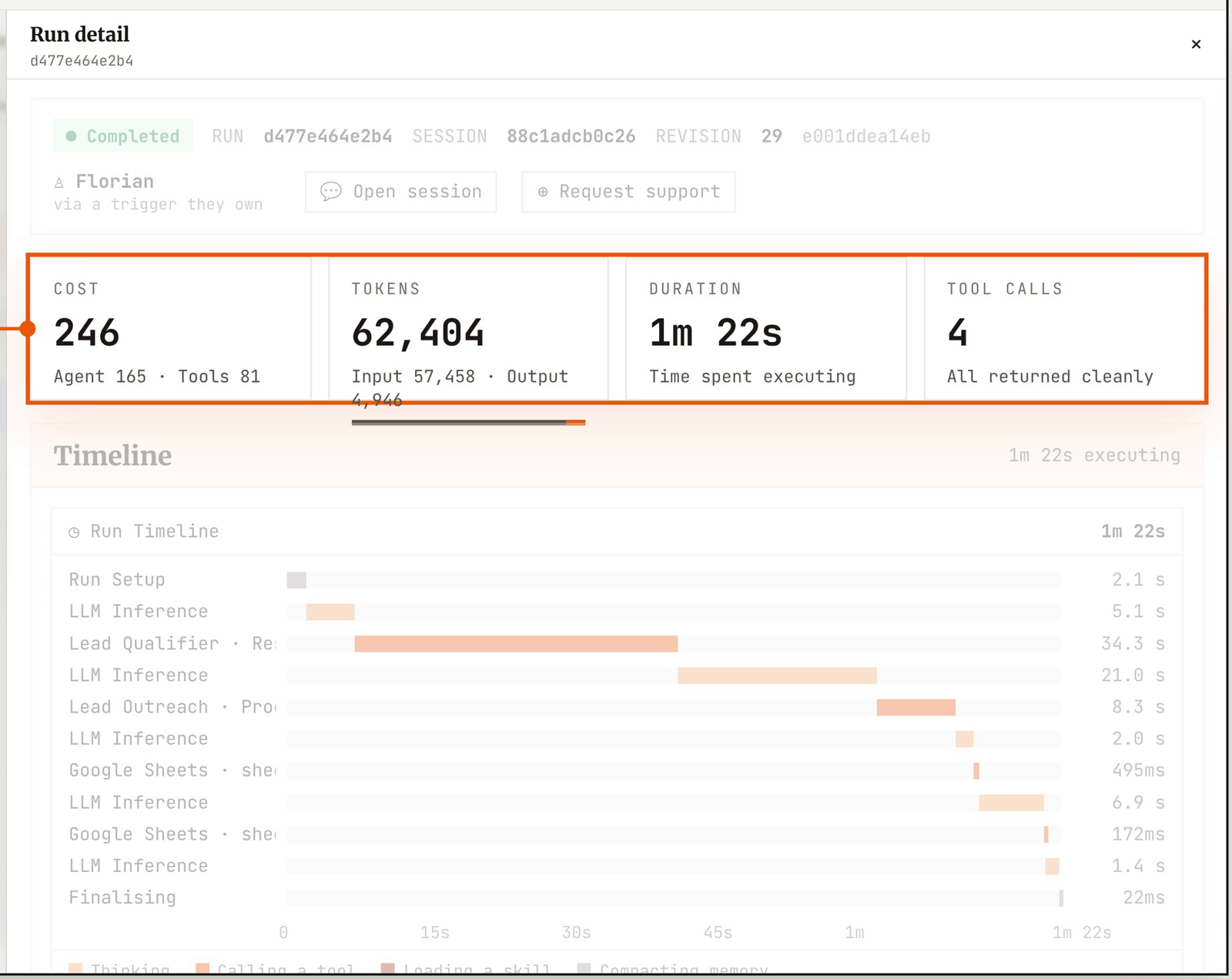
Open any run and the top of the panel sums it up: credits used, total tokens, how long it took and how many tool calls it made and whether every tool call returned cleanly.
Confirm a run finished as expected, compare it with its neighbours, set a budget and forecast spend before you scale.
Run timeline: where the time went
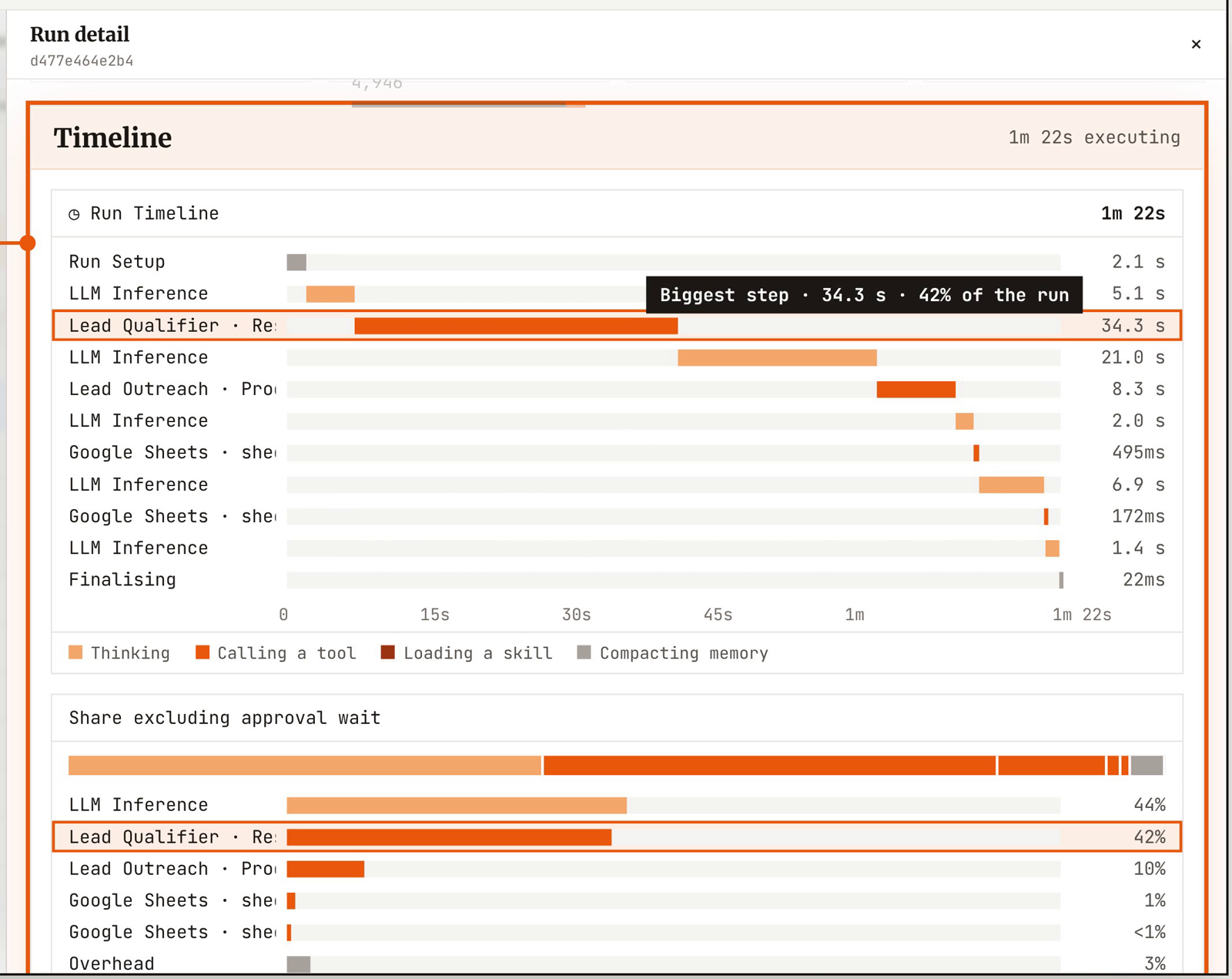
Below the headline numbers, the run timeline lays the run out stage by stage, showing how long each took and what share of the run it accounted for, excluding any wait for approval. Thinking, calling a tool, or running a task are clearly distinguished, making it easier to analyse the full agent workflow.
Find the slowest, costliest steps, then tighten a prompt or swap a model and test the change before it reaches customers. For the lead qualifier, the longest bar usually points straight at the research step.
Execution flow: the full trace
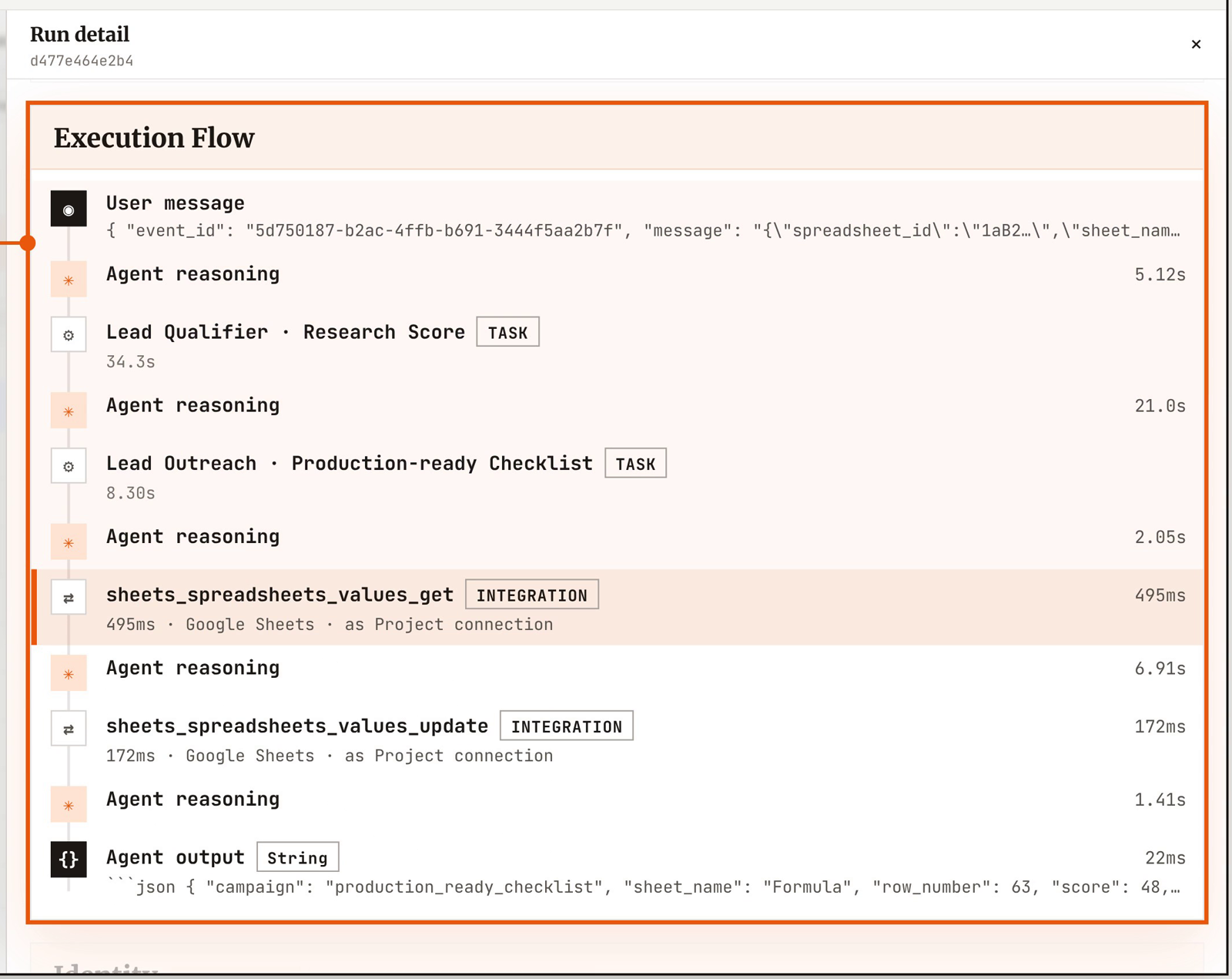
Next is the execution flow, the run told in order: the incoming message, each stretch of the agent's reasoning, the task tools it used, each integration it called and the final output. The lead qualifier reads like a short story: scoring the lead, preparing the outreach, reading the sheet and updating it.
Check each required step ran, confirm the tools were called in the right order and debug from evidence. A completed run can still be a partial one, and the trace is how you tell.
Identity and access: who ran it, and as whom
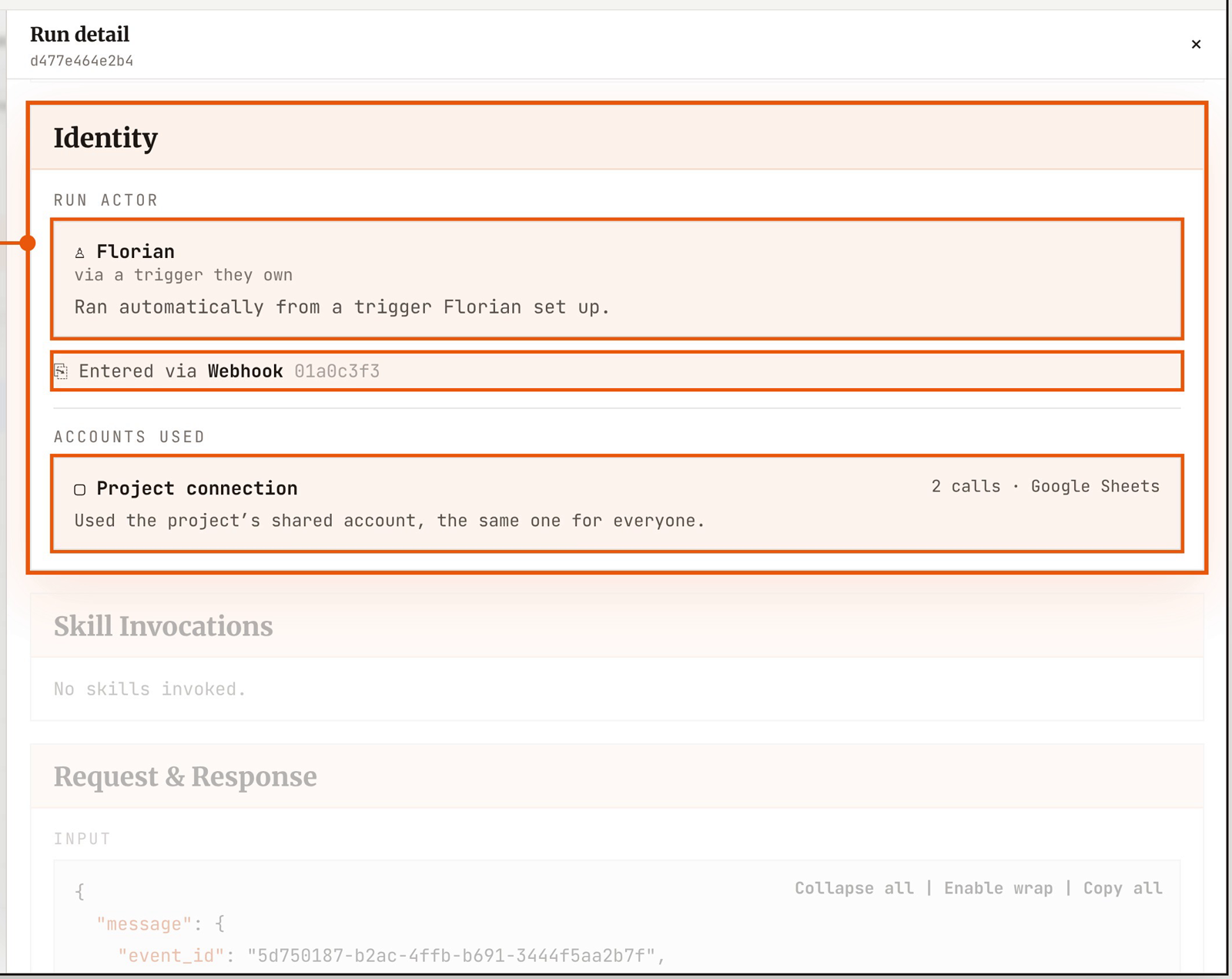
Every run carries its identity. You can see who triggered the agent, whether a person or an automatic trigger someone on the team set up, and how the run came in, such as a webhook. You can also see which accounts it used to reach outside tools, marked as the project's shared connection or an individual's own sign-in, and which skills it called on.
When a reviewer asks who had access to what, the answer is already written down.
Full event data: the raw record
For teams who want to go deeper, the complete raw event data sits at the bottom of the panel, with the run’s full input and output and a button to copy it all. It's there for troubleshooting a failed run and for full audits of agent activity. And when a run needs a second pair of eyes, you can request support from Rightbrain on the exact run, with secrets redacted from what gets shared.
Beyond a single run
A single run tells one story. The same record rolls up into reports on tokens, credits, timing and usage for each agent, and runs can be tagged into reporting groups, by customer or feature for example, so usage lines up with who it was for. Alongside sits a tamper-evident audit log of activity in the project, for the day someone needs to verify the audit history hasn’t been altered.
Florian Ruspi
Head of Growth, Rightbrain
Florian Ruspi is Head of Growth at Rightbrain.
Run agents on a real runtime
Get in touch and see the tracing, replay, and resilience that make agents production-ready.