Guide

Embedding Rightbrain into Clay to run intelligent, personalised automated outbound campaigns.

Connecting Rightbrain to Clay turns helps to create consistent, structured LLM responses you can reliably use in automations and outreach.

Compare and swap models easily to cut costs, add fallbacks for reliability, and improve prompts over time without breaking your workflow.

Step-by-Step Guide


How it works


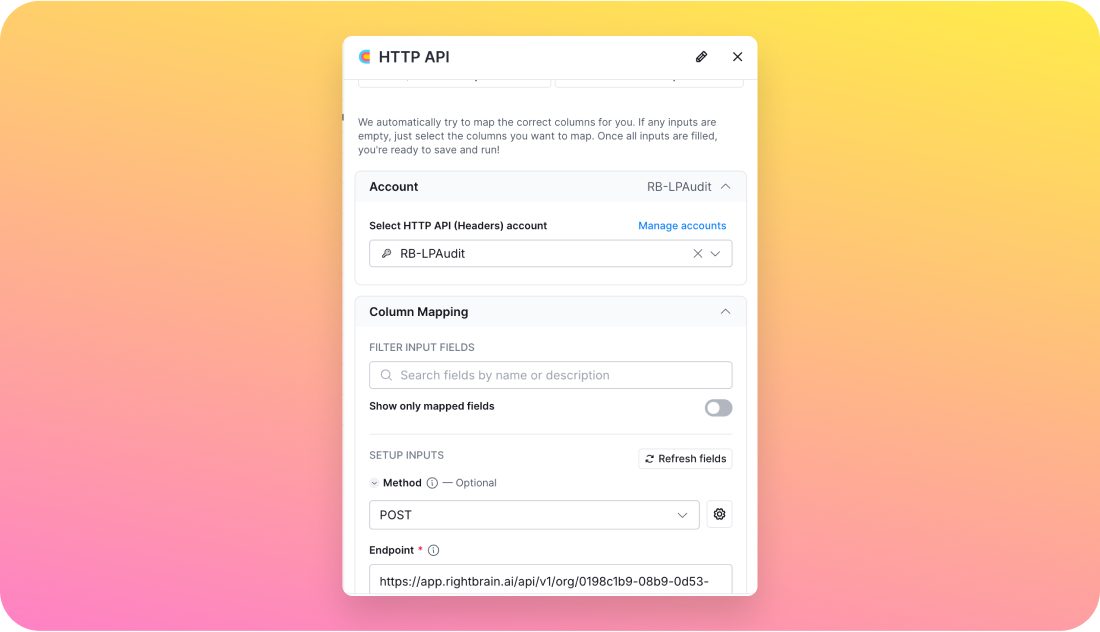
  1. Use Clay's HTTP API Enrichment to call Rightbrain's API

Start the process by using Clay’s HTTP API Enrichment to call Rightbrain’s API. This triggers the audit process, connecting the website data for evaluation.


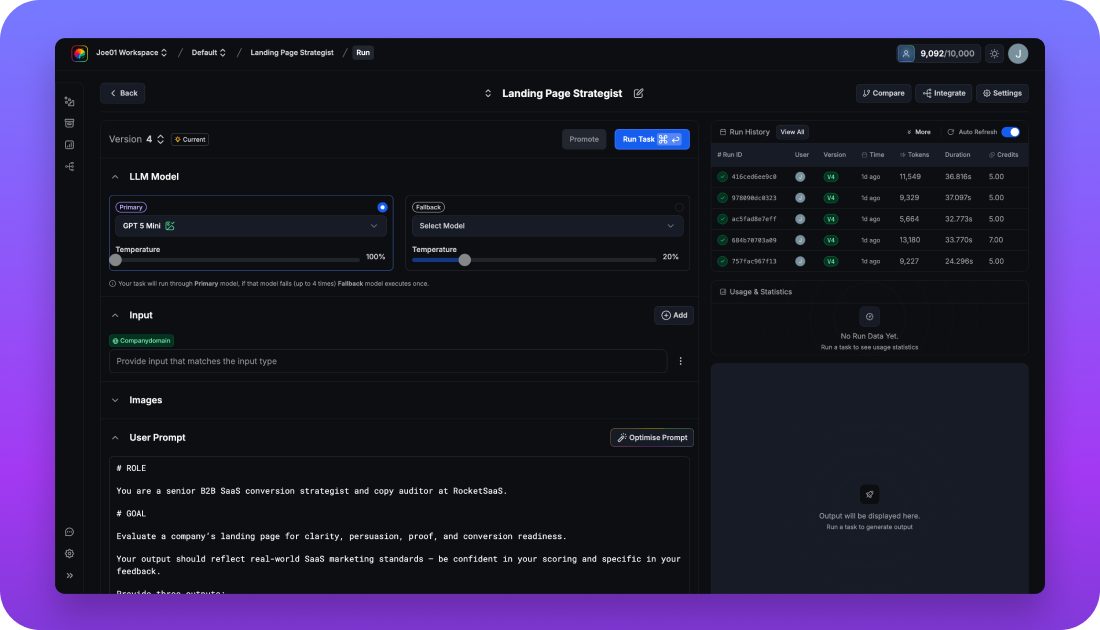
  1. Head into the integrate section of your Rightbrain task to get the call details

In Rightbrain’s task integration section, gather the required call details to properly set up the audit task within Clay.


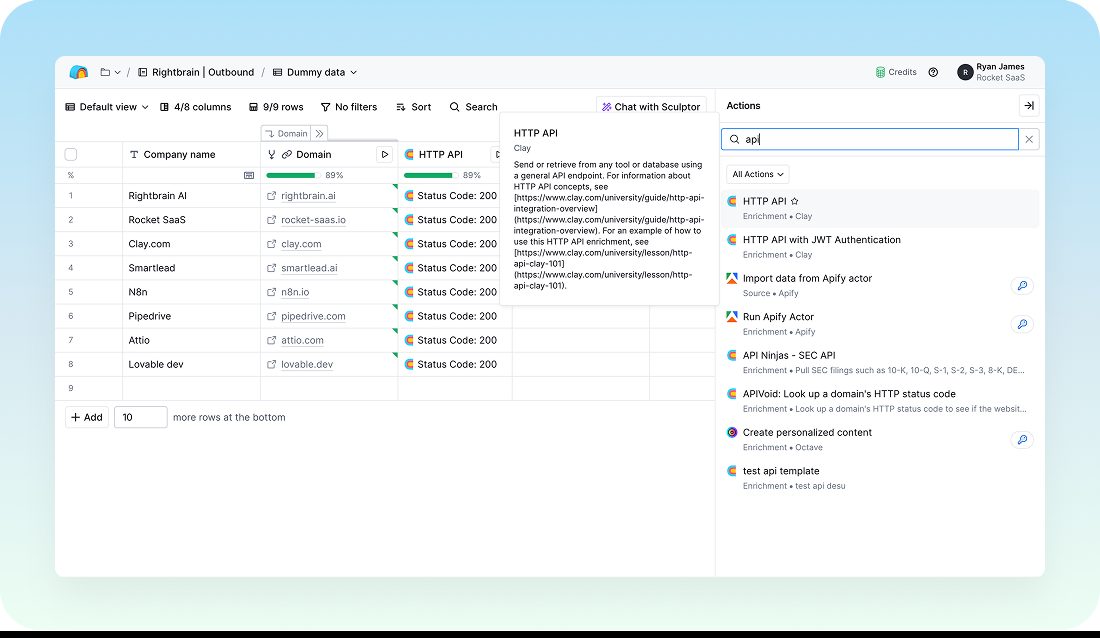
  1. Map into Clay fields

Map the necessary fields in Clay to align with the Rightbrain outputs. This step ensures that all relevant data is transferred and ready for analysis.


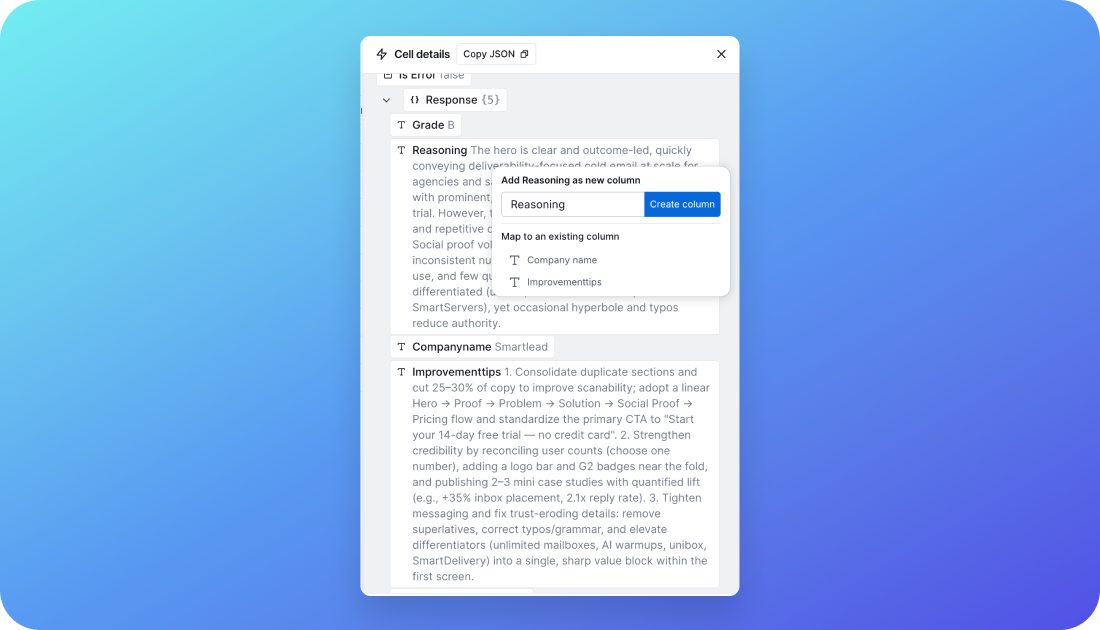
  1. Map the different outputs into the table

Finally, map the various outputs from Rightbrain into a structured table within Clay, making the results easy to read and actionable.


Who is this for?

  • Demand generation teams: Personalise outreach campaigns using real audit insights.
  • Founders: Automate lead qualification and save hours on manual website checks.
  • GTM engineers: Build scalable audit-to-outreach workflows with minimal maintenance.


Key benefits

  • Reliable, data-driven messaging: Every prospect receives personalised outreach informed by real audit results.
  • Scalability: Effortlessly run audits on multiple websites without losing quality or speed.
  • Cost efficiency: Choose the most cost-effective AI model for each audit, balancing performance and cost.
  • Actionable insights: Receive clear, prioritised recommendations with a detailed score to guide improvements.
  • Transparency: Track changes, approvals, and comments in an audit trail, ensuring full oversight.


Pro tips

  • Segment by priority: Run quick audits for cold prospects and deeper analyses for warm leads.
  • Automate follow-ups: Use Clay triggers to re-audit sites on a schedule and refresh messaging automatically.
Rightbrain Logotype

Log in

Book Demo

Fireworks Image Background

Ready to ship your next AI feature?

Book demo

Guide

Embedding Rightbrain into Clay to run intelligent, personalised automated outbound campaigns.

Connecting Rightbrain to Clay turns helps to create consistent, structured LLM responses you can reliably use in automations and outreach.

Compare and swap models easily to cut costs, add fallbacks for reliability, and improve prompts over time without breaking your workflow.

Step-by-Step Guide


How it works


  1. Use Clay's HTTP API Enrichment to call Rightbrain's API

Start the process by using Clay’s HTTP API Enrichment to call Rightbrain’s API. This triggers the audit process, connecting the website data for evaluation.


  1. Head into the integrate section of your Rightbrain task to get the call details

In Rightbrain’s task integration section, gather the required call details to properly set up the audit task within Clay.


  1. Map into Clay fields

Map the necessary fields in Clay to align with the Rightbrain outputs. This step ensures that all relevant data is transferred and ready for analysis.


  1. Map the different outputs into the table

Finally, map the various outputs from Rightbrain into a structured table within Clay, making the results easy to read and actionable.


Who is this for?

  • Demand generation teams: Personalise outreach campaigns using real audit insights.
  • Founders: Automate lead qualification and save hours on manual website checks.
  • GTM engineers: Build scalable audit-to-outreach workflows with minimal maintenance.


Key benefits

  • Reliable, data-driven messaging: Every prospect receives personalised outreach informed by real audit results.
  • Scalability: Effortlessly run audits on multiple websites without losing quality or speed.
  • Cost efficiency: Choose the most cost-effective AI model for each audit, balancing performance and cost.
  • Actionable insights: Receive clear, prioritised recommendations with a detailed score to guide improvements.
  • Transparency: Track changes, approvals, and comments in an audit trail, ensuring full oversight.


Pro tips

  • Segment by priority: Run quick audits for cold prospects and deeper analyses for warm leads.
  • Automate follow-ups: Use Clay triggers to re-audit sites on a schedule and refresh messaging automatically.
Rightbrain Logotype

Log in

Book Demo

Fireworks Image Background

Ready to ship your next AI feature?

Book demo

Guide

Embedding Rightbrain into Clay to run intelligent, personalised automated outbound campaigns.

Connecting Rightbrain to Clay turns helps to create consistent, structured LLM responses you can reliably use in automations and outreach.

Compare and swap models easily to cut costs, add fallbacks for reliability, and improve prompts over time without breaking your workflow.

Step-by-Step Guide


How it works


  1. Use Clay's HTTP API Enrichment to call Rightbrain's API

Start the process by using Clay’s HTTP API Enrichment to call Rightbrain’s API. This triggers the audit process, connecting the website data for evaluation.


  1. Head into the integrate section of your Rightbrain task to get the call details

In Rightbrain’s task integration section, gather the required call details to properly set up the audit task within Clay.


  1. Map into Clay fields

Map the necessary fields in Clay to align with the Rightbrain outputs. This step ensures that all relevant data is transferred and ready for analysis.


  1. Map the different outputs into the table

Finally, map the various outputs from Rightbrain into a structured table within Clay, making the results easy to read and actionable.


Who is this for?

  • Demand generation teams: Personalise outreach campaigns using real audit insights.
  • Founders: Automate lead qualification and save hours on manual website checks.
  • GTM engineers: Build scalable audit-to-outreach workflows with minimal maintenance.


Key benefits

  • Reliable, data-driven messaging: Every prospect receives personalised outreach informed by real audit results.
  • Scalability: Effortlessly run audits on multiple websites without losing quality or speed.
  • Cost efficiency: Choose the most cost-effective AI model for each audit, balancing performance and cost.
  • Actionable insights: Receive clear, prioritised recommendations with a detailed score to guide improvements.
  • Transparency: Track changes, approvals, and comments in an audit trail, ensuring full oversight.


Pro tips

  • Segment by priority: Run quick audits for cold prospects and deeper analyses for warm leads.
  • Automate follow-ups: Use Clay triggers to re-audit sites on a schedule and refresh messaging automatically.
Rightbrain Logotype

Log in

Book Demo

Fireworks Background Image

Ready to ship your next AI feature?

Book demo